How Much Is My Steam Account Worth? Calculate Your CS2 Inventory Value

7
min
0
0
You open your old CS2 inventory and spot a rifle skin you barely remember, a stack of cases, and a sticker capsule from a past Major. You paid little attention to them at the time, but their prices may have changed. Before you accept a trade or set a sale price, find out what those items could fetch today.
If your first question is “how much is my Steam account worth,” start with the items you can actually trade. We will explain how to calculate your csgo inventory value, check unusual skins, and estimate potential proceeds. Read on so that you can turn an uncertain total into a useful price estimate.
What Does Steam Account Value Actually Mean?
The phrase “value of my Steam account” can describe three different amounts. Separate them before you add any prices, because they do not show the same type of value.
Inventory value covers the estimated market value of eligible items. In CS2, that can include weapon skins, knives, gloves, cases, capsules, and unused stickers. You calculate this total from comparable market prices, then adjust individual copies for collector traits.
Steam Wallet value means the balance you can spend through Steam. A $100.00 Wallet balance gives you funds for eligible purchases, but you cannot withdraw that balance as cash. Keep it separate from your inventory estimate.
Account value usually means a theoretical total for games, DLC, profile extras, and inventory items. You may find that total useful, although Steam has no official formula for an account resale price.
When you think about “my Steam account price,” decide what you need the number for. A record of past purchases answers a different question from the amount you could receive for eligible skins. Your game library, Wallet, and tradable items therefore need separate totals. If you want to track the “value of my Steam account” over time, save a dated inventory estimate and note any new purchases separately.
How to Calculate Your CS2 Inventory Value
Your CS2 inventory value depends on the current market price of each tradable item in your inventory. A reliable estimate uses comparable prices from the same market type and currency.
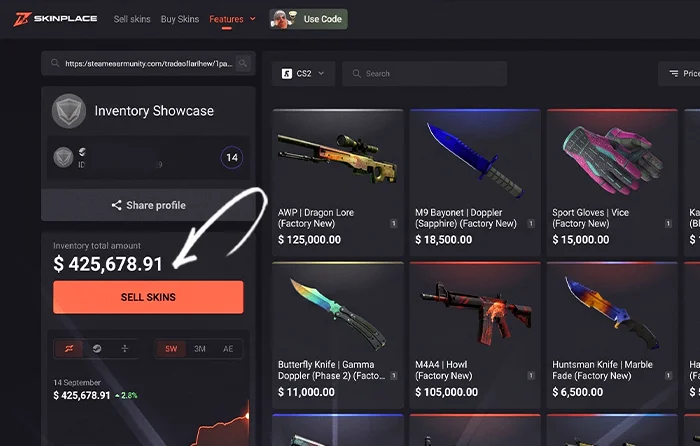
Start with this formula:
Estimated inventory value = the current comparable market prices of all eligible items added together.
For a useful csgo inventory value estimate, use one currency and one market basis throughout. Otherwise, a mix of Steam prices and cash offers can distort your total.
- Open Your Steam Inventory
Open Steam, visit your profile, and select Inventory. Confirm you have the correct account before recording any items or quantities.
- Filter for Counter-Strike 2
Select Counter-Strike 2 so that you can focus on its items first. Count duplicate cases, capsules, and stickers, since inexpensive items can add up across a large stack.
- Identify Tradable Items
Check both tradable and marketable status. An item may qualify for one route but not another. Keep temporary trade locks separate from permanent restrictions, and check when locked items become available again.
- Record the Current Market Price
Match the weapon, finish, exterior, and variant. Compare recent sales and competitive offers, not the amount you paid years ago. Record the date beside the price.
- Add the Values Together
Multiply unit prices by quantities, then add the subtotals. For example, a hypothetical $120.00 rifle, an $80.00 pistol, and ten cases at $2.00 each total $220.00 before fees. These amounts illustrate the calculation, rather than current skin prices.
- Adjust for Special Items
Inspect float, pattern seed, stickers, StatTrak, and Souvenir status before you finalize the total. A spreadsheet can keep those details beside the base price so a rare copy doesn’t disappear into an ordinary average.
For the hypothetical $220.00 inventory above, suppose comparable sales support an extra $30.00 for the rifle’s pattern. Your adjusted estimate becomes $250.00 before fees. Add that premium only once, and record the comparison that supports it. Unless another buyer values the same trait, the final sale may still fall below your estimate.
How to See My Inventory Worth?
For a quick answer to “how to see my inventory worth,” use an inventory calculator that supports CS2. You can usually enter a Steam profile link or SteamID and receive an estimate from accessible inventory data.
A public-inventory calculator needs access to your items. If your inventory is private, check your inventory privacy options before the scan. You can choose a manual estimate instead if you prefer to keep your inventory private.
After the scan, review the currency, total item count, and price source. Make sure you know whether the tool uses live offers, recent sales, or another market reference. A Steam-based total will not necessarily match a cash-market total, even when both tools detect identical items.
Next, sort the results by value and inspect your most expensive copies. A rare knife pattern or unusual sticker craft deserves more attention than another common case. Use the calculator to save time across routine items, then spend that time on the details that could change your estimate most. Never send skins to another account merely to obtain a price check.
In order to avoid an incomplete total, compare the scan with your inventory item count. If the tool skips a page or cannot load an item, retry before you accept the result. Wait until the scan finishes, while you check that duplicate items contribute their full quantity.
Why Your Steam Account Value May Be Different From Your Inventory Value
Your Steam profile can show years of game purchases, DLC, achievements, badges, cards, backgrounds, emotes, and CS2 skins. Yet you cannot treat every part as an item you can resell.
For example, you can have a large game library and only a small tradable inventory. A library estimate may add current store prices or past discounts, but that total does not represent potential proceeds. Achievements and profile levels also do not create a cash balance. Do not use game-library costs as “my Steam account price,” even though those purchases form part of your account history.
When you ask “how much is my Steam account worth,” begin with eligible items and keep personal value separate. You may care about a rare badge or thousands of hours in CS2, but those details do not set a market price for your skins.
You also cannot do an account transfer like an ordinary skin trade. Your account is personal, and the Steam Subscriber Agreement does not allow you to sell or transfer it. An inventory estimate therefore does not establish an approved account sale price.
Common Mistakes When Calculating CS2 Inventory Value
Your csgo inventory value can drift far from a realistic estimate if you compare the wrong details. A few checks can prevent the most common errors.
An old receipt shows your original cost, so don’t use it as the current value. A skin that cost $50.00 can later trade for more or less than that. Likewise, the highest active offer shows what a seller requests, not what buyers accept.
Match exterior and float before you compare two copies. Then rate the pattern and craft, because either trait can justify further research. Neither an expensive sticker nor a memorable seed automatically earns a premium, and applied stickers rarely retain their full unused price.
Keep Steam Wallet estimates separate from cash proceeds, and verify unusual items manually even if a calculator produces a precise total. Finally, exclude permanently ineligible items from your available sale total. Temporarily locked skins can retain market value, but you cannot count them as immediately available funds.
How to Price My Steam Account Before a Skin Sale
If you want to “price my Steam account” before a skin sale, focus on expected inventory proceeds. The calculator total comes first; your potential payout comes after market comparisons and costs.
Start with the most valuable items, then verify their exact variants against current offers. Compare a Steam estimate with relevant cash prices on the same date. A fixed conversion rate can give you the wrong estimate, as each skin can have a different market gap.
Next, account for fees. Steam shows a difference between the buyer’s total and your final proceeds because transaction fees are deducted. For a cash sale, check any sale fee, withdrawal charge, and currency conversion cost.
Suppose your hypothetical gross cash proceeds equal $500.00 and the applicable costs total $25.00. Your estimate becomes $475.00. If an instant offer is lower, compare that discount with the time you may need to find another buyer. Liquidity means how readily an item can sell near its estimated price. For a faster sale, compare buy orders with sale offers. The gap between those prices helps explain why an immediate payout may fall below your estimate.
Set a realistic range rather than one rigid number, as long as current comparisons support both ends. Use the lower end for a faster sale and the upper end for a patient offer. As soon as comparable prices move, update the range before you accept a deal.
What Should I Do After Calculating My Inventory Value?
After you work out your CSGO inventory value, think about what you want to do next. A strong total does not require an immediate sale. You can keep the skins you enjoy during matches. If your favorite AK or gloves still best your taste, personal value can matter more than a short-term price change.
Instead of trading to something else you like, or buy CS2 (CS:GO) skins on a budget, look into cs trade reversal and the time frame involved. CS2 items you receive through trades have seven days of Trade Protection, which affects when you can transfer them again.
In case you want to get rid of the items that you don’t use, check out Sell CS2 (CS:GO) skins and see what kind of income you can get. Keep your favorite skins or exchange the eligible ones for money.
Can I Increase My Inventory Value?
You can change your inventory total through new purchases, trades, and market price movements. However, extra deposits increase the collection’s cost too. A larger total does not automatically mean a profit.
Before you add a skin, compare demand, available supply, wear, and any pattern premium. Learn how those details affect value so that you can judge offers more accurately. Avoid repeated transactions that consume your budget through fees, and keep a record of what you spend.
Just as prices can rise, so can they fall. Keep an item because you accept its cost and enjoy it, rather than assume a future buyer will pay more. Neither a past price peak nor a rare finish guarantees a gain.
How Accurate Are Steam Inventory Calculators?
Before you ask a tool to “price my Steam account,” decide if you need a Steam market estimate or potential cash proceeds. An inventory calculator works best as a fast first estimate. You can scan a large collection, identify expensive items, and decide where a manual check deserves your attention.
If you search “how to see my inventory worth,” remember that the final number depends on the data behind it. Rare patterns, exceptionally low floats, and specific sticker combinations may need separate premiums. Newly released skins and items with few sales can also lack reliable comparisons.
Before you trust a total, check not only the price source but also the last update and any missing items. Refresh the estimate whenever the market moves or your inventory changes. If two tools disagree, compare the same individual skin in both before you assume either total is wrong. An accurate ordinary-item estimate can still miss the value of a special copy.
Conclusion
All in all, your csgo inventory value matters most when you can explain the prices behind it. Start with eligible items, inspect expensive copies, and account for wear, float, patterns, stickers, rarity, StatTrak, Souvenir status, and demand. Then subtract the relevant costs before you estimate potential proceeds.
There is no official formula that turns your entire Steam account into a guaranteed sale price. A calculator can help you organize the work, but your item checks give the total meaning. Open your inventory, review your most valuable skins, and choose your next step based on current comparisons rather than an impressive number alone.
FAQ
How much is my Steam account worth?
Your Steam account has no single official resale price. For a practical estimate, add the current comparable prices of eligible inventory items. Keep Wallet funds and game-library estimates separate, then deduct applicable costs to estimate potential proceeds.
Can I sell my entire Steam account?
No. Steam prohibits users from selling or transferring their accounts. You can sell eligible individual items through available market routes, subject to the applicable terms and item status. A skin sale does not require you to transfer your account or share your password.
Why is my inventory calculator showing a different price?
Calculator totals can differ because each tool pulls prices from different sources. A calculator may also miss a pattern or craft premium. Compare identical copies on the same market basis to find the source of the difference.
Does Steam show the total value of my inventory?
Steam does not provide a complete built-in inventory valuation. You can review market information for eligible items and add their prices manually, or use a third-party calculator for an approximate total. Valuable skins should still be checked one by one.

Subscribe
0 Comments