CS2 (CS:GO) Float Guide: Understanding CS2 Wear Ratings

6
min
0
0
Some people like shiny, new skins, while others prefer worn-out skins with scratches and a battle vibe. CS2 offers both. A key factor in determining a CS2 skin’s condition and price is its float value, a numerical parameter that reflects the skin’s degree of wear and determines its wear category. Understanding the CS2 wear rating is crucial for players and traders, as it determines the skin’s price. Let’s delve into the intricacies of the CS2 skin float value one by one!
What Is the Float Value in CS2 (CS:GO)?
In Counter-Strike 2, a skin’s float value is a numerical value between 0.00 and 1.00 that reflects its wear. The lower the float value, the better the skin looks. It typically has no scratches or abrasions. As the float value increases, chips and patina may appear on the weapon’s surface. Generally, the lower the float value, the more valuable the skin. However, there are exceptions. For example, the Well-Worn version of the AK-47 | Wasteland Rebel is more expensive than the Field-Tested version. Float value data is stored on Valve’s servers and is unique to each skin.
How CS2 Float Value Works
Each skin in CS2 has its own unique float value. It’s assigned to a skin upon creation and doesn’t change over time. Each knife, pair of gloves, and weapon skin has its own CS2 float value range. Depending on this range, a skin can be available in five wear levels: Factory New, Minimal Wear, Field-Tested, Well-Worn, and Battle Scarred. Some skins are available in all levels, as they have a full float value — from 0.00 to 1.00. Some have a limited float value, so they are only available, for example, in Factory New and Minimal Wear.
Thus, the most expensive CS:GO (CS2) skin, Karambit | Case Hardened (Blue Gem), has a full float value — from 0.00 to 1.00. This means, (CS:GO) CS2 most expensive knife is available in all grades of wear. While M9 Bayonet | Rust Coat, not the cheapest CS2 knife, but one of them, has a very limited float value, from 0.40 to 1.00. As such, it is only available in Well Worn and Battle Scarred states. Next, we will take a closer look at such skins.
As for the most expensive gloves in CS2, they are mostly available in all levels of wear, but their float value is not full. The float value of Sport Gloves | Vice, for example, varies between 0.06-0.80. So, the float value directly affects the skin’s visual appearance, rarity, and price.
CS2 Skin Wear Levels and Float Ranges
Float value determines the skin’s wear level. A skin can be available in five wear levels. Let’s take a closer look.
Factory New (FN)
Factory New skins have a float value in the range of 0.00–0.07. In this condition, skins look excellent. They are bright, with a clear pattern, and are free of scratches. These skins are the most valuable on the market and are sought after by traders and collectors.
Minimal Wear (MW)
Minimal Wear skins have a float value in the range of 0.07–0.15. These skins may have minor, barely noticeable abrasions and chips. Overall, they look quite good. These skins are a good choice for those who want value for money.
Field-Tested (FT)
Field-Tested skins have a float value in the range of 0.15–0.38. These skins may have fairly visible scratches and abrasions, but the design is still clearly visible. Some skins in this quality also offer good value for money.
Well-Worn (WW)
Well-Worn skins have a float value of 0.38–0.45. These skins show visible signs of wear, which significantly detract from the design. However, these skins still have a realistic appearance, very similar to actual weapon use in battle.
Battle-Scarred (BS)
Battle-Scarred skins have a float value of 0.45–1.00. These skins look the worst. Some may have significant paint wear, while others simply darken with a patina. These are usually the cheapest CS2 (CS:GO) skins on the market. However, there are exceptions.
| Wear level | Float value | Features |
|---|---|---|
| Factory New | 0.00–0.07 | The skin looks like new |
| Minimal Wear | 0.07–0.15 | There are minor abrasions on the skin |
| Field-Tested | 0.15–0.38 | The skin has a fair amount of scratches, but it’s still a good value for money |
| Well-Worn | 0.38–0.45 | The skin looks quite worn, but the pattern can still be noticed |
| Battle-Scarred | 0.45–1.00 | The skin looks very worn or has a thick layer of patina |
What Are Float Caps in CS2?
Some skins in CS2 have so-called float caps. This means the skin has an incomplete float value range. It can be available in only two or three wear levels. An example of such a skin is AK-47 | Redline. Its float value ranges from 0.10 to 0.70. It is available in all wear levels except Factory New. Another example is Desert Eagle | Conspiracy, with a float value from 0.00 to 0.30. It is only available in Factory New, Minimal Wear, and Field-Tested versions. These are very interesting features of skins. It’s important to pay attention to them when trading.
How to Check Float Value in CS2
The float value of a CS2 skin is stored on Valve’s servers and is not shown directly in the Steam inventory. To view it, you need to extract the item’s inspect link and use it to query the item’s data. Here is the exact process:
1. Open the Item and Access Its Inspect Link
Each CS2 skin has a unique inspect link that contains the item’s asset ID and can be used to request its float value.
To copy it:
- Open your Steam Inventory
- Select the skin
- Click the small arrow next to Inspect (or right-click the item, depending on UI)
- Choose “Copy Inspect Link”
This link starts with steam://rungame/730/... and includes item-specific parameters.
2. Use the Inspect Link to Retrieve Float Data
Paste this link into any float-checking interface that supports inspect link requests.
The interface sends a direct query to Valve’s Game Coordinator (GC), which returns the item’s properties, including:
- floatvalue – the exact wear number from 0.00 to 1.00
- paintseed – the skin’s pattern seed
- paintindex – the pattern template used
- defindex – identifies the weapon type
The response also includes whether the item is StatTrak™, Souvenir, or contains unique attributes.
3. Understand the Returned Float Information
After querying the inspect link, you will see the exact float. It usually looks like:
- Example:
0.06753211(Factory New) - Example:
0.89720144(Battle-Scarred)
Even within the same wear tier, the difference between something like 0.0701 and 0.1500 can be visually significant.
You will also be able to view:
- Pattern seed (important for skins like Case Hardened, Dopplers, etc.)
- Minimum and maximum possible float values for that item
- Where your skin ranks within the float range (e.g., lowest 3%)
4. Inspect Directly in CS2 (Optional)
In CS2 itself, you can visually inspect the wear by pressing F while the item is previewed.
However, the game still does not show the float value; only third-party inspection via the inspect link reveals the exact number.
5. Checking Float on Items You Don’t Own
The same method works for marketplace listings or trade offers:
- Copy the seller’s inspect link from the listing
- Paste it into a float-check interface
You will receive the float value even if the item is not in your inventory.
6. Important Notes About Float Retrieval
- The float is determined when the item is created and never changes
- The float depends on the skin’s paint kit and wear range limits
- Some skins cannot reach certain floats (e.g., some cannot be 0.00)
- Float affects both appearance and market price
CS2 Float Extremes: Lowest and Highest Float Skins
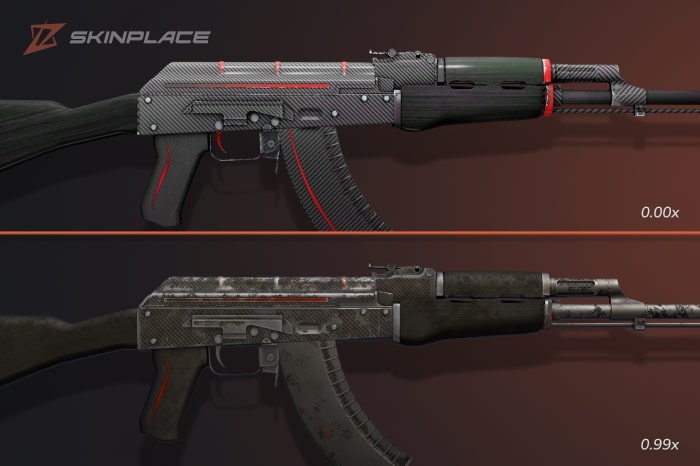
CS2 has fans of so-called extreme float values. These include skins with a float value of 0.00x or, conversely, very high ones of 0.99x. Skins with extremely low float values are prized for their completely new visuals. Skins with extremely high float values are prized for their battle vibe. Collectors and traders are often willing to pay a premium for extreme float values.
How Float Value Affects CS2 Skin Prices
Float value directly impacts skin prices, creating a balance between rarity, visual appeal, and value. Let’s explore the key aspects of how float value influences skin value:
- Limited low float values: CS2 has few skins with extremely low float values, especially in the early skin collections in CS:GO. These skins can be considered true treasures by highly interested collectors and players, and their prices can be correspondingly high.
- The appeal of high-float skins: CS2 has some high-float skins, which are more valuable than low-float skins. Collectors are drawn to these skins for their unique battle vibe, and sometimes they feature rust, which hints at the design’s history.
- Skins with float caps: Some skins have a limited float value. This means that the skin is only available, for example, in Minimal Wear and Field Tested quality. These skins are also quite attractive to collectors and can fetch a significant price on the market.
Tips for Buying and Trading CS2 Float Skins
Skin trading requires an understanding of skin pricing. Understanding skin float values is crucial for success. If you’re buying a skin, check the float value directly in its product card on the platform. This information is usually always available. Compare several offers for the same skin but with different float values. Evaluate how much they differ visually and in price. You can use websites to check the float value range and other characteristics of a particular skin in advance. This will help you better understand what to look for and what will suit your needs.
If you want to sell CS:GO (CS2) skins, it’s important to explore its value. Initially, it’s recommended to estimate the characteristics of the skin being offered, including float value, wear level, rarity, patterns, and StatTrak. For this, you can use online checkers that will tell you everything you need to know about the skin’s authenticity. Browse offers for similar skins on the market and decide on a price for your skin in case of a P2P sale.
Conclusion
Float value is an important characteristic of a CS2 skin, determining its visual appeal and market value. Skins with low float values look more attractive and tend to fetch higher prices than skins with low float values. However, there are also high-float vibe skins that are prized by players and collectors for their combat-ready appearance. If you want to sell or buy CS:GO (CS2) skins, especially for collecting purposes, be sure to study its float value.
FAQ
What is float in CS2 (CS:GO)?
Float value is a numerical indicator from 0.00 to 1.00 that determines the degree of wear of the skin.
What are the float ranges in CS2 skins?
Each skin in CS2 has its own float range; it can be full (0.00-1.00) or incomplete (for example, 0.40-1.00)
What is considered a good float in CS2?
A good float is considered to be the one where the skin looks the brightest and newest. This is usually 0.00–0.07.
Is 0.1 float good for CS2 skins?
Float value 0.1 corresponds to the Minimal Wear level.
Is 0.09 a float rare in CS2?
Float value 0.09 corresponds to the Minimal Wear level.
What is the rarest float value in (CS:GO) CS2?
The rarest float values in CS2 are considered to be extremely low and extremely high — 0.00x or 0.99x.
What does a float appraiser do in CS2?
This is a tool that a CS2 player can use to check the float value of a skin and other characteristics.
Is a higher or lower float better in CS2?
The lower the float value, the more visually appealing the skin is and the more expensive it is. The higher the float value, the more worn it looks and the lower the price. Everyone has their own tastes and preferences.
Can you change a CS2 (CS:GO) skin’s float value?
Players cannot change a skin's float value; this data is assigned to the skin upon creation and stored on Valve's server. Players can only buy and sell skins with different float values.
What are float caps in CS2, and why do they matter?
Float caps refer to the float range limitations of a specific skin. Therefore, some skins may not be available in Factory New, Battle Scarred, or other wear levels.

Subscribe
0 Comments